One click to extract LinkedIn employee profiles, Enrich email with Email Finder API, save to CSV / Excel / JSON file.
Get started - it's free






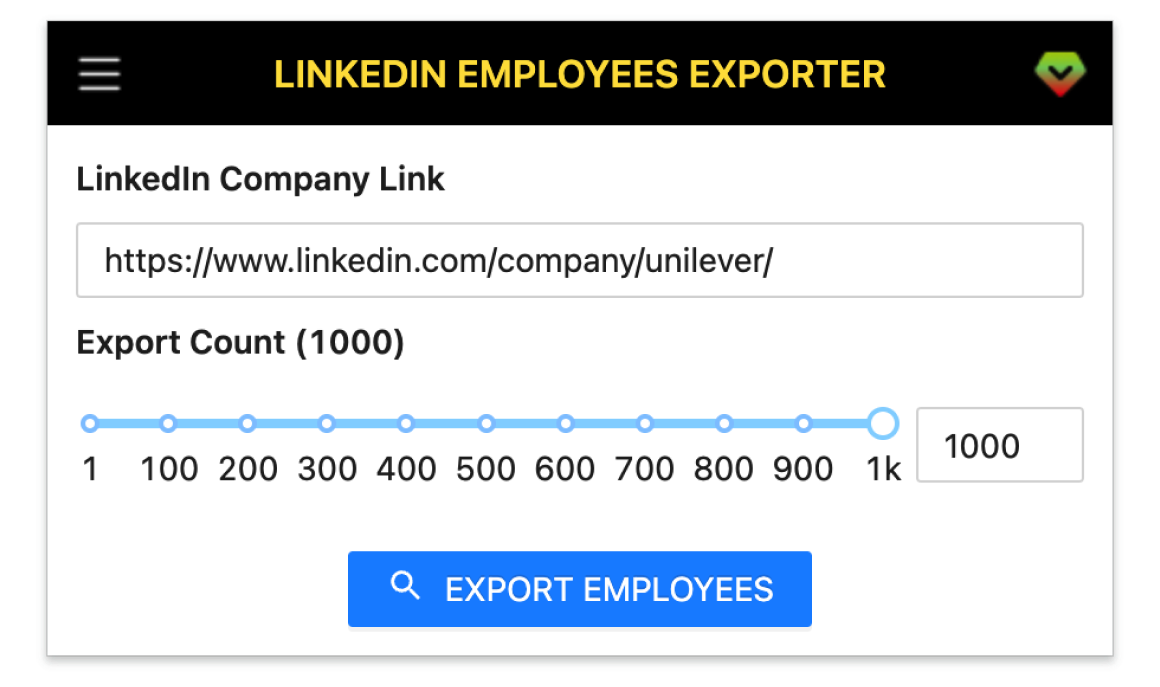
A smart tool to extract the employee profiles with Emails of a company on LinkedIn into CSV file.
Scrape employee lists from LinkedIn company pages with one click.
Capture company, school and additional profile metadata for each person.
Find emails via Apollo, Hunter, Snov, Datagma and more providers.
Handle large searches reliably with progress resume from history.
Download clean datasets in CSV, XLSX or JSON formats.
Get started in a few simple steps.
Add LinkedIn Company Employees Exporter to your browser.
Paste the LinkedIn company link into the extension and click Export.
Download the exported data as CSV / Excel / JSON.
How teams use LinkedIn Company Employees Exporter in their daily workflow.
Build targeted employee lists from competitor companies and enrich emails for outreach.
Source candidates from specific companies and export profiles for pipeline tracking.
Identify key roles inside target accounts to accelerate intro and partnership efforts.
Create role-based contact lists for ABM campaigns and sync via CSV/Excel/JSON.
Map account stakeholders to improve onboarding, renewals and expansion plays.
Track org changes and hiring signals by exporting employees from target companies.
Fields included in exported datasets.
| Field | Description | Example |
|---|---|---|
| SEARCH URL | The LinkedIn search URL used to fetch this dataset. | https://www.linkedin.com/search/results/people/?keywords=Acme |
| Public Identifier | User's public profile handle used in LinkedIn profile URLs. | john-doe-123456 |
| Profile Link | Direct link to the LinkedIn profile. | https://www.linkedin.com/in/john-doe-123456/ |
| First Name | User's given name. | John |
| Last Name | User's family name. | Doe |
| Full Name | Concatenated full name. | John Doe |
| Subtitle | Headline displayed under the user's name. | Senior Software Engineer at Acme |
| Location | Profile location as shown on LinkedIn. | San Francisco Bay Area |
| Picture URL | Profile picture direct URL. | https://media.licdn.com/dms/image/C4E03AQ... |
| Birth Date | Birth date if available. | 1990-05-12 |
| Industry Name | User's primary industry. | Information Technology & Services |
| Degree | LinkedIn connection degree (1st/2nd/3rd). | 2nd |
| Summary | About/Summary section from profile. | B2B sales leader with 10+ years in SaaS. |
| Job Title | Current role title. | Senior Software Engineer |
| Employment Type | Employment type such as full-time, contract, etc. | Full-time |
| Job Date Range | Date range for the current role. | Jan 2022 - Present |
| Company Name | Employer company name. | Acme Inc. |
| Company URL | LinkedIn company page URL. | https://www.linkedin.com/company/acme-inc/ |
| Company ID | LinkedIn internal company numeric id. | 1234567 |
| Company Industry | Industry of the employer. | Computer Software |
| Company Location | Headquarters or listed location for the company. | San Francisco, CA |
| Company Employee Count | Approximate employee range for the company. | 1001-5000 |
| School Name | Education institution name. | Massachusetts Institute of Technology |
| Degree Name | Degree obtained for the listed education. | Master's |
| Field Of Study | Field/major of the degree. | Computer Science |
| Education Date | Date range for the education entry. | 2015 - 2017 |
| Skills | Top skills listed on the profile. | JavaScript; React; Node.js |
| Certifications | Professional certifications. | AWS Solutions Architect Associate |
| Projects | Highlighted projects or work samples. | LinkedIn Exporter; Data Pipeline Migration |
| GEO Location Name | Geocoded locality name. | San Francisco |
| GEO Country Name | Geocoded country name. | United States |
| Prefer Country Code | Preferred country ISO code. | US |
| Prefer Language Code | Preferred language ISO code. | en |
| Is Creator | Whether the profile is in LinkedIn Creator Mode. | true |
| Is Influencer | Whether LinkedIn marks the profile as an influencer. | false |
| Is Premium | Whether the profile has a LinkedIn Premium subscription. | true |
Where you can get answers to common questions about LinkedIn Company Employees Exporter
You don’t have to take our word for it
We paste a company link and get a clean employee list with emails in minutes—our SDR ramp time dropped dramatically.
Michael
Sales Manager
Perfect for ABM—exports are reliable, de‑duped, and easy to push into our campaigns via CSV/Excel.
Jessie
Growth Marketer
Email enrichment just works. I spend time writing messages, not copying data from LinkedIn.
Raj
SDR
Great for sourcing from competitor teams—titles, company info, and profiles export neatly every time.
Anna
Recruiter
Fast, stable, and accurate. We validated target accounts and found decision makers in one afternoon.
Daniel
Founder
The resume-from-history saved us after a network hiccup—no lost progress, no rework.
Sofia
Product Marketing
Stakeholder mapping is much easier now—we export account org charts and plan outreach quickly.
 Ethan
Customer Success
Ethan
Customer Success
Clean exports with education and role details help us shortlist candidates without manual scraping.
 Maya
Talent Acquisition
Maya
Talent Acquisition
Consistent schema and company fields make it easy to blend with our CRM data model.
 Lucas
Sales Operations
Lucas
Sales Operations
JSON export is gold—quick to parse and perfect for enrichment pipelines and QA checks.
 Olivia
Data Analyst
Olivia
Data Analyst
Paste a company link, enrich emails automatically, and download to CSV/Excel/JSON — no coding.
7-day money-back guarantee on Pro. Cancel anytime.